

Table of contents Show Hide
The OBS Backup Utility is a free script that backs up your OBS profiles, scenes and settings automatically, on a schedule you choose, and cleans up old backups for you. I made it because we all forget to back up until it’s too late.
Grab the latest version from the Tools page.
1. Install the script
- In OBS, go to Tools → Scripts.
- Click + and select
OBS_Backups_v1.py. - Click the script in the Loaded Scripts list to see its settings on the right.
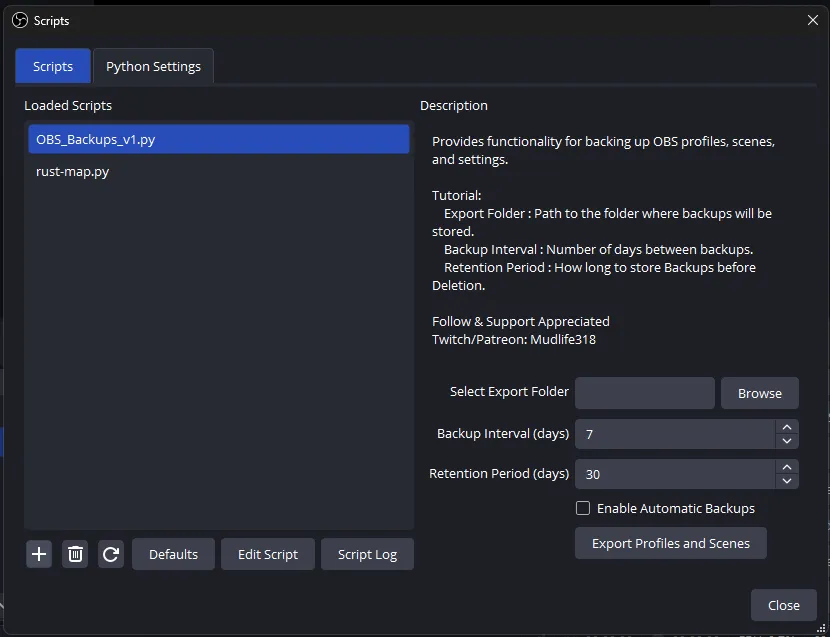
2. Choose where backups go
Click Browse next to Select Export Folder and pick a folder.
Tip: choose a NAS or a mapped cloud folder (OneDrive, Google Drive and so on) rather than a folder on the same PC. If your machine dies completely, your backups survive.
Each backup is saved in its own timestamped folder inside the one you picked, for example:
backup_2024-09-15_14-06-353. Set the schedule
- Backup Interval (days): how often a backup runs.
7means once a week. - Retention Period (days): how long backups are kept before they’re deleted automatically.
30keeps about a month of weekly backups.
4. Turn it on
Tick Enable Automatic Backups. That’s the whole point. From now on it runs by itself.
Backing up by hand
Changing a lot of scenes, or about to update OBS or Windows? Click Export Profiles and Scenes to take a backup right now, on top of the schedule.
Restoring a backup
Open the timestamped folder you want, then in OBS use Scene Collection → Import and Profile → Import to bring them back. For the full picture of what OBS stores and where, see Back Up Your OBS Settings Before You Lose Them.
Quick checklist
- Script added under Tools → Scripts
- Export folder on a NAS or cloud folder
- Interval and retention set
- Enable Automatic Backups ticked